The TeamViewer Community will undergo scheduled maintenance on Wednesday, Nov. 18, from 2:00-5:00 AM CET.
The Community may be temporarily unavailable during this time. We apologize for the inconvenience. For more information, visit our Status page.
Hi,
I have a problem with connecting to the pc from my mother. Normally when I try to connect with Teamviewer and my mother with Quicksupport, I enter the password after her permission, and then
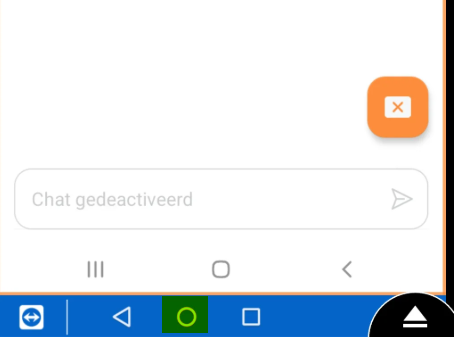
I can help her with things. Now Teamviever has a new look and we can't connect anymore. When we now try to connect it gives you after a short time a white screen with on top the sentence : scherm delen actief and on top Quicksupport and at the bottom it says: Chat gedeactiveerd. We both have the same screen. What might be the problem and how can we fix it?
Hi @LE76,
Welcome to the TeamViewer Community☺️
It looks like your device is already connected to your mother's device. In the second image you shared, the orange frame indicates that you're viewing the remote screen.
If both devices support remote control, you can tap the round icon at the bottom (highlighted in yellow) to return to the home screen of the remote device and begin controlling it.
To find out if both of the devices are fully supported by TeamViewer, could you please let us know (my understanding is that your device is initiating a connection to your mother's device.):
Looking forward to hearing from your soon😊
Best,
Chisa
Be part of the conversations shaping TeamViewer
Learn more about the latest feature we’ve released.
Discover quick, practical tips to get more out of TeamViewer each month.