The TeamViewer Community will undergo scheduled maintenance on Wednesday, Nov. 18, from 2:00-5:00 AM CET.
The Community may be temporarily unavailable during this time. We apologize for the inconvenience. For more information, visit our Status page.
I install unattended hosts, then can't find them in TeamViewer. After reading some search results I find that apparently it is normal that TeamViewer doesn't concern itself with what the remote device calls itself, and just puts it in the list under another name. Who approved that stupid decision? I have to know and record the TeamViewer ID of the device in order to make sure it is properly identified in my control panel? Why do I have no way to query what the device reported itself as s I can correct the mislabeling?
Hi @GMTuser,
Welcome to the TeamViewer Community😊
Let’s say you have two devices: Device A and Device B. You want to control Device B (the remote device) using Device A (the local device).
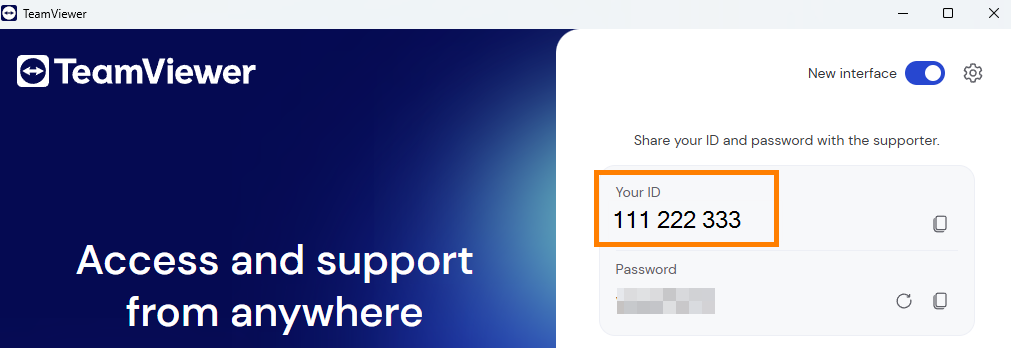
The number shown under "Your ID" on the login page represents that specific device’s TeamViewer ID. So if you see “111 222 333” on the TeamViewer login page of Device B, that’s its unique ID.
To establish unattended access, you’ll need to complete the initial setup on the remote device—Device B. This step is explained under the section titled “Set up remote access on your remote device” in this article:Set up remote access on your remote device
Once the setup is complete, the device ID (e.g., 111 222 333) should appear under the All managed devices tab in your TeamViewer account. You can then log in to your account on Device A, locate the ID, and click it to start an unattended remote session.
💡 You can also assign an alias to the Device B to make it easier to identify. Let us know if you’d like help with that!
If this doesn’t fully address your question, feel free to share more details about your setup, such as:
Hope this helps.😀
Best regards,
Chisa
Be part of the conversations shaping TeamViewer
Learn more about the latest feature we’ve released.
Discover quick, practical tips to get more out of TeamViewer each month.