The TeamViewer Community will undergo scheduled maintenance on Wednesday, Nov. 18, from 2:00-5:00 AM CET.
The Community may be temporarily unavailable during this time. We apologize for the inconvenience. For more information, visit our Status page.
Hi,
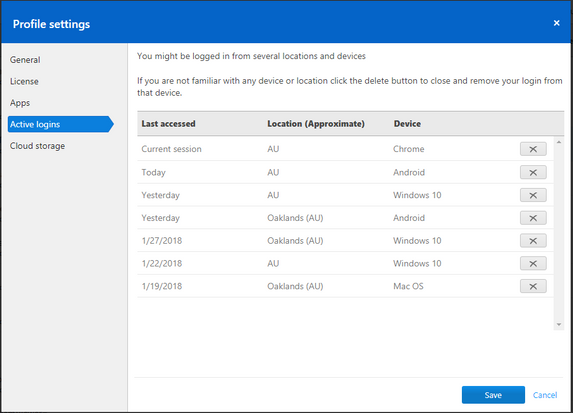
I had TeamViewer installed on my Android phone which has been misplaced. My phone TeamViewer has connection to my computer. Please let me know how to prevent someone from accessing my computer from my misplaced phone that has connection to my computer.
Thank you in anticipation.
Regards,
Riz
Thank you Scotty.
Is there a way I can permanently block the Android device so that I can never access to my computer?
Rizwan
Hi Riz,
Thanks for posting and I am sorry to hear you have lost your device.
We would recommend you log out of the remote device by logging into your account hereThen go to "Active Logins" and remove your mobile device. This will sign you out on that device. If it is not listed here, then it is not signed in.You may also want to reset your password.
I hope this has helped and that you find your phone!
-Scotty
Be part of the conversations shaping TeamViewer
Learn more about the latest feature we’ve released.
Discover quick, practical tips to get more out of TeamViewer each month.