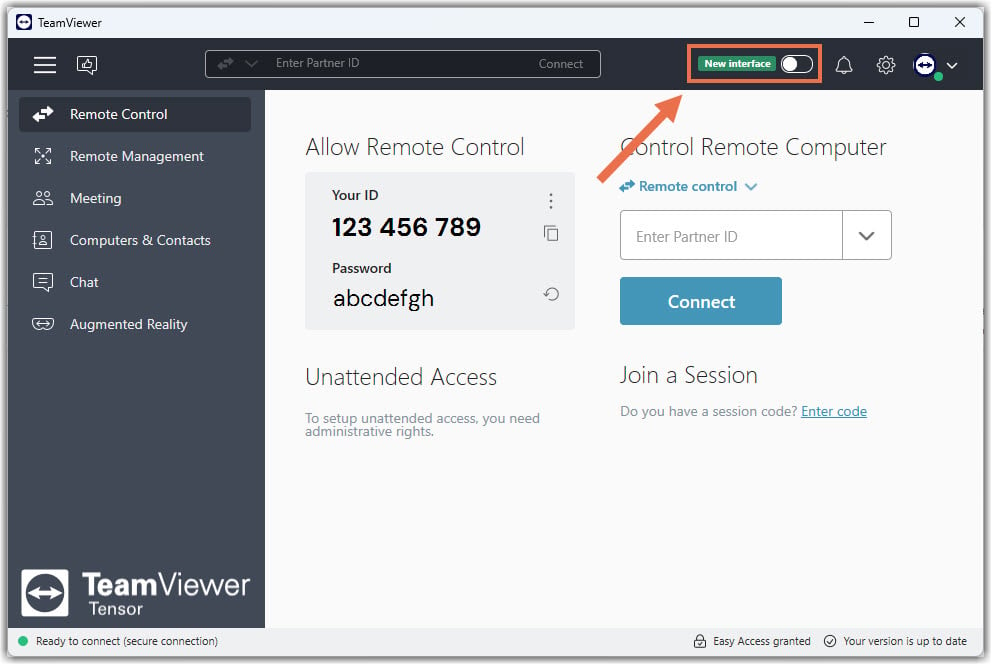
With this update, TeamViewer Tensor admins now have the flexibility to explore the new user interface directly from their desktop client. A dedicated toggle will allow you to switch between the old and the new interface at any time, making it easier to evaluate the updated experience firsthand and understand how it can support your daily workflows.
The redesigned UI introduces a more intuitive layout, improved visibility, and enhanced productivity features that align with TeamViewer’s latest platform advancements. As an admin, you can now dive in, test the improvements, and decide how and when to bring the new interface to your organization.

What’s new in the TeamViewer Tensor Interface
Based on the updated product experience introduced in the latest release, the new UI brings several enhancements that improve everyday workflows and visibility across your remote‑access environment.
Key improvements include:
- Streamlined and customizable navigation for faster access to your tools.
- AI-powered Session Insights to help automate reporting and strengthen compliance.
- A consolidated Security Center that centralizes essential controls in one place.
- Improved device management and more intuitive policy handling.
- Optional Windows LAPS integration for managing privileged access securely.
These enhancements make the new UI not only more modern but also more powerful for enterprise environments.
How admins can switch between the old and new UI
Starting in February, admins will see a toggle in their TeamViewer Tensor desktop client that allows them to switch freely between the old and new UI. This toggle is available only to admins, allowing them to test and explore the new layout without affecting their users.
Important:
The Management Console is not affected by this update; no toggle will appear there, and enabling the new UI does not change any workflows inside the Management Console.
How UI behavior works when deploying TeamViewer via MSI
If your organization deploys TeamViewer using MSI, here is how the default behavior will apply:
Default behavior
- When the end user launches TeamViewer for the first time, the new UI is displayed automatically on the end user’s device.
- If no admin configuration is applied (company setting or TeamViewer policy), the second restart of the client will revert the UI back to the old interface.
When admin configurations override the default behavior
The following settings will always overrule the standard logic described above:
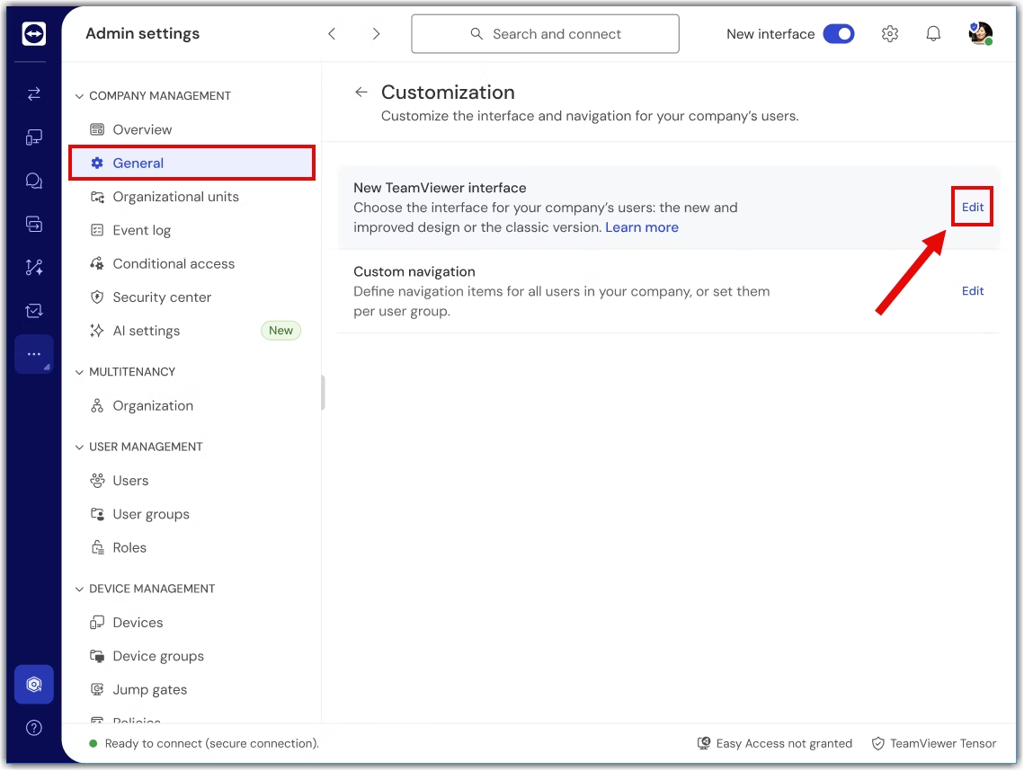
1. Company settings
If the admin configures in the company settings that the new UI should be enabled or disabled,
this decision takes priority over the default “first start / second start” behavior.
2. TeamViewer policy
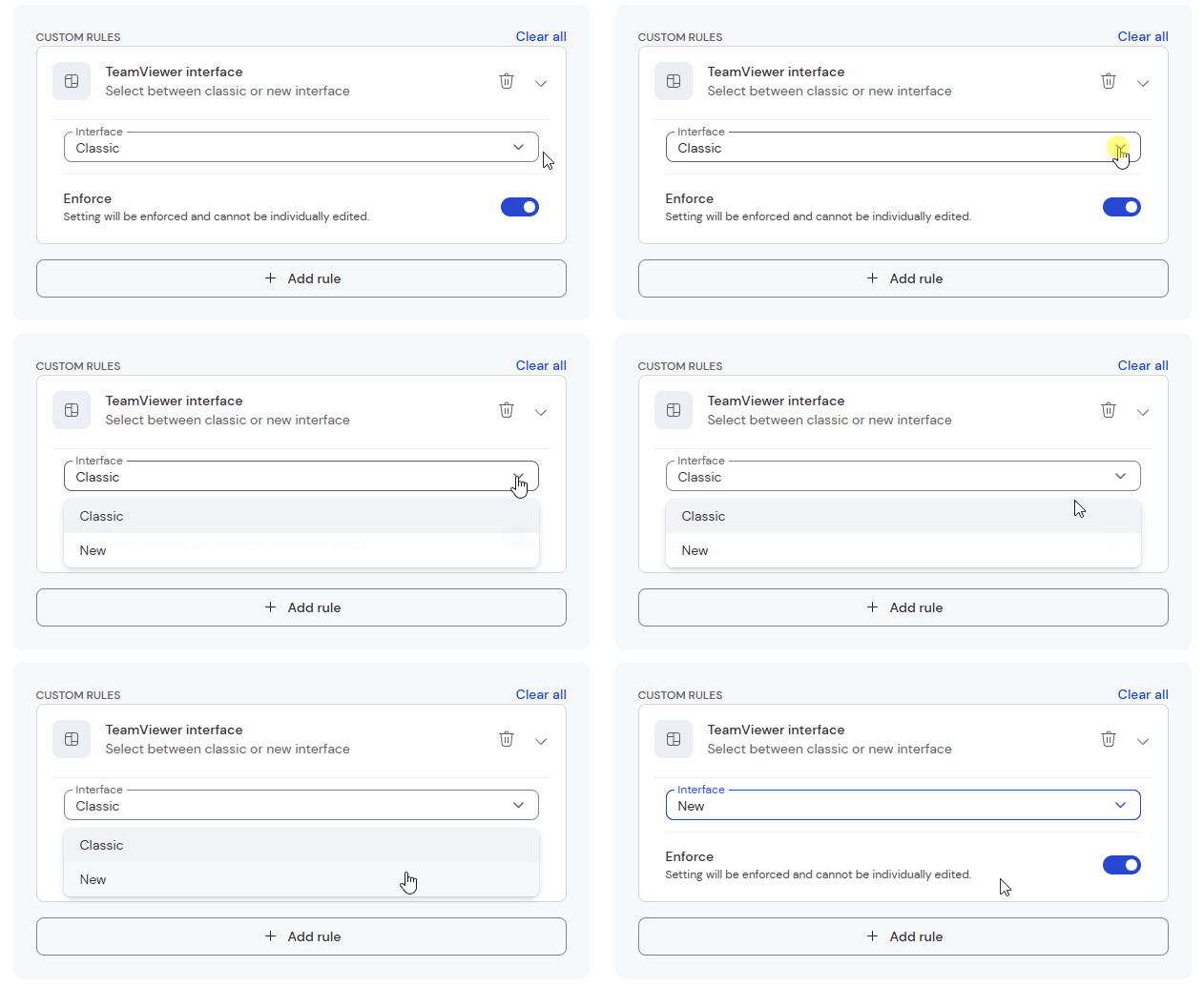
If a TeamViewer policy that includes the TeamViewer interface rule is assigned and configured to enable the new UI, this policy becomes the highest‑priority override, taking precedence over both the default behavior and any settings defined at the company level, as TeamViewer policies always overrule company settings.
How to ensure admins can use the toggle freely
If you want, as a TeamViewer Tensor admin, to keep the option to switch between the old and new UI for their own evaluation:
- Do not set the UI setting in company settings, and
- Ensure no policy is assigned that enforces the new UI.
This way, the admin UI toggle remains available and fully functional.
Try the new UI in the browser
If you want to explore the new UI in a browser, without installing or switching anything, the TeamViewer in the browser already runs on the new interface.
Try it here:
https://web.teamviewer.com/
This is a great option if:
- You want a quick preview of the new UI
- You work remotely or from multiple devices
- You need a lightweight, browser‑based workflow
Why this matters for you, TeamViewer Tensor admins
This update is designed to help you:
- Evaluate the new UI without impacting your organization and internal workflows
- Familiarize yourself with upcoming software improvements
- Leverage new capabilities, such as AI-powered Session Insights and the improved device management system
- Provide better guidance to your users so that you feel confident setting the new UI as your company‑wide default experience.
The toggle puts you in control, explore at your own pace.
Share your feedback
We’d love to hear how the new TeamViewer Tensor interface works for you.
Share your experience with the new UI in the comments below.
Your feedback helps us continue improving the product for all Tensor admins.
