Planned Maintenance: We will be conducting scheduled maintenance on Friday, July 27, 2018 from 08:00 AM (CEST) to 12:00 PM (CEST)
This may affect the availability of our service. If you encounter problems, please wait a few minutes and try again. We apologize for any inconvenience this may cause and thank you for your patience. Please follow our current status on our status page.
just updated from Teamviewer 12 (which worked fine at the time*) via the 64-bit deb provided from the download page.
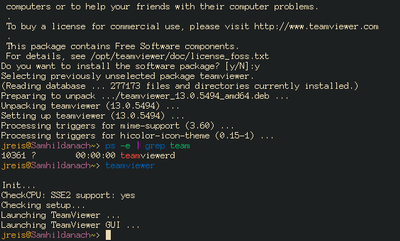
Terminal output …However no GUI materializes. In fact nothing at all happens. There is no tray icon, no window, no process shown via ps (other than teamviewrd). I do not know if the server portion is working (ie whether I'd be able to log into the computer) since I uninstalled & purged Teamviewer 12 before installing 13—and thus am not able to log in to my Teamviwer Account. or otherwise get the ID for this machine in order to attempt a connection.
Debian 9.2 | kernel 4.9 | no Desktop Environment, just a window manager (JWM) running on top of X. Willing to provide logs if instructed how to do so. Please advise.
*
though I did have a very similar issue with the GUI in version 12 back in April. I opened ticket #3093852. I received a request from Gilberto for logs, which I sent and that is the end of my own documentation on the issue. I do not recall what (if anything) I did to rectify the situation, it is very probable that simply updating teamviewer resolved the issue for me at that time.
_________
Updated to add info (I just found out about 'teamviewer --info' while reading around on the forums. So here it is, in case it is useful:
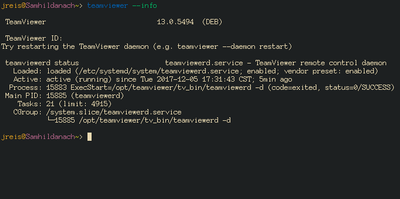
Solved! Go to Solution.
Tech support was able to confirm for me that the Display Manager is the likely culprit. Saying:
"TeamViewer relies on session info to be made available to the daemon. The desktop manager (lightdm) is involved in this. TeamViewer needs this information to allow connecting to the login screen (lightdm) and then transfer to the actual user session.
We focus on that ability in our development. However, your scenario is also valid of course. Once we get the (non-installed) TAR package fixed, you might prefer it however. You should be able to just start it when needed and it should also work if no desktop manager exists."
I requested additional information about how this necessary information was accessed by TV, hoping I might be able to provide it manually via dbus or something but no further information was provided. As such, one can bite the bullet and use a display manager or wait for the "tar package" version of TV to be provided—either way issue "solved."
I humbly suggest that TV should add "display manager" as a dependency in the deb package so this issue can be avoided. At the very least TV should throw some kind of useful error instead of silently failing under this condition.
Same with me here. Except for that I get a window frame with not repainted window content. I use debian 9.2 with KDE plasmashell desktop.
Support was kind enough to engage with me via email. Since there's at least one other person with a similar issue and perhaps more to come, I'm posting that exchange here to bump the thread.
No suggestion yet for a solution, but at least someone is taking a second look. Kudos to the TV team for that!
System up (startx > start jwm): ~10:01:20Regarding niche configurations. I understand what you're trying to say. Broadly, I'm pleased anytime a company is willing to provide Linux compatibility, much less support of any kind. I also recognize the fact that I'm a non-paying user. So my expectations for support are tempered and I very much do appreciate your getting back with me.
attempt manual start teamviewer GUI: ~10:03:44
teamviewer daemon restart: ~10:04:51
My problem seemed to be a long initialization the first time I run the TV 13 on my system. I reinstalled it couple of times, with downgrade to 12 and back to 13. Then suddenly I realized that the TV13 window was open and initialized. Since then it starts quickly and is usable.
Had a bit of time to try and sort this out and made some progress. The issue is resolved for me by installing Xfce4 and rebooting.
Specifically I installed Xfce4 via apt, then logged out of X and from the terminal into Xfce via 'exec startxfce4' in xinitrc. At this point Teamviewer still did not work (same behavior as before, no gui, no error, output ends at 'Launching TeamViewer GUI ...'). After rebooting, which dropped brought me to a display manager (as Xfce installed lightdm automatically). Logging into Xfce, Teamviewer now works as expected. Indeed, even loggin out of Xfce and back into jwm (via the display manager) and Teamviewer works in jwm as well. Uninstalling Xfce and associated packages breaks Teamviewer once again, returning its behavior to its original state (no gui shown).
A few possibilities come to mind:
1.) One of the packages pulled by Xfce fixes the issue both in Xfce and in jwm, but only after a reboot (does that narrow down which one?).
2.) Logging in through a display manager rather that using 'startx' from terminal fixes the issue. Maybe due to some kind of difference in what kind of session/secure session is launched? I'm not nearly familiar enough with the nitty-gritty of how these sorts of things work to know, but it seems like it might be something like that.
Next step would be to reinstall Xfce and mess around with loggin in via lighdm vs terminal to narrow it down. If it works both ways I guess I start installing packages one at a time until I find the combination that works, but maybe there's enough clues in all this that someone smarter than I can identify the issue and save me the trouble!
Here's a list of the packages added to my system when installing Xfce:
Tech support was able to confirm for me that the Display Manager is the likely culprit. Saying:
"TeamViewer relies on session info to be made available to the daemon. The desktop manager (lightdm) is involved in this. TeamViewer needs this information to allow connecting to the login screen (lightdm) and then transfer to the actual user session.
We focus on that ability in our development. However, your scenario is also valid of course. Once we get the (non-installed) TAR package fixed, you might prefer it however. You should be able to just start it when needed and it should also work if no desktop manager exists."
I requested additional information about how this necessary information was accessed by TV, hoping I might be able to provide it manually via dbus or something but no further information was provided. As such, one can bite the bullet and use a display manager or wait for the "tar package" version of TV to be provided—either way issue "solved."
I humbly suggest that TV should add "display manager" as a dependency in the deb package so this issue can be avoided. At the very least TV should throw some kind of useful error instead of silently failing under this condition.
Hello,
simililar problem (TV12 was working fine):
debian 9: tar.xz version
I see in log:
2017/12/19 18:10:24.451 14909 140681964977344 G SysSessionInfoManager: observing sessions from logind is marked as reliable
2017/12/19 18:10:24.451 14909 140681964977344 G SysSessionInfoManager: Session Information provided by VT [priority: 2]
2017/12/19 18:10:24.453 14909 140681964977344 G SysSessionInfoManager: own session cache set to '4294967295'
2017/12/19 18:10:24.454 14909 140681964977344 G Running on Qt 5.7.1
2017/12/19 18:10:24.483 14909 140681964977344 G Initialised XRandR extension 1.5 (base=89 error=147)
2017/12/19 18:10:24.561 14909 140681964977344 G MonitorInfo: [XRandR 1.2] CRTC DVI-I-1 1920x1080@60Hz [3840, 0, 5760, 1080] - 1
2017/12/19 18:10:24.561 14909 140681964977344 G MonitorInfo: [XRandR 1.2] CRTC HDMI-0 1920x1080@60Hz [0, 0, 1920, 1080] - 1
2017/12/19 18:10:24.561 14909 140681964977344 G MonitorInfo: [XRandR 1.2] CRTC DP-0 1920x1200@60Hz [1920, 0, 3840, 1200] - 1
2017/12/19 18:10:24.561 14909 140681964977344 G MonitorInfo: [XRandR 1.2] CRTC 3 has no outputs
2017/12/19 18:10:24.561 14909 140681964977344 G Virtual Desktop [0, 0, 5760, 1200]
2017/12/19 18:10:24.561 14909 140681964977344 G!! MonitorInfo: WorkingArea: Property error 14 (0), Errorcode=2
2017/12/19 18:10:24.601 14909 140681964977344 G InterProcessBase:
ecureNetwork created
2017/12/19 18:10:24.602 14909 140681964977344 G AutoLogin::Login: enabled: 1
2017/12/19 18:10:24.603 14909 140681964977344 G WindowsSessionStateManager(0x283e020) state 0
2017/12/19 18:10:24.603 14909 140681964977344 G!!!Own session could not be resolved, unable to startup, Errorcode=2
2017/12/19 18:10:24.604 14909 140681964977344 G!! ConfigurationHub::HandleRegistrationResponse(): registering for feature 5 failed with error 2, Errorcode=2
2017/12/19 18:10:24.604 14909 140681964977344 G!! ConfigurationHub::HandleRegistrationResponse(): registering for feature 6 failed with error 2, Errorcode=2
2017/12/19 18:10:24.605 14909 140681964977344 G!! ConfigurationHub::HandleRegistrationResponse(): registering for feature 9 failed with error 2, Errorcode=2
2017/12/19 18:10:24.605 14909 140681964977344 G!! ConfigurationHub::HandleRegistrationResponse(): registering for feature 10 failed with error 2, Errorcode=2
2017/12/19 18:10:24.606 14909 140681964977344 G interprocessbase:
ecureNetwork destroyed
2017/12/19 18:10:24.611 14909 140681964977344 G Shutting down System DBus
I hope it helps.