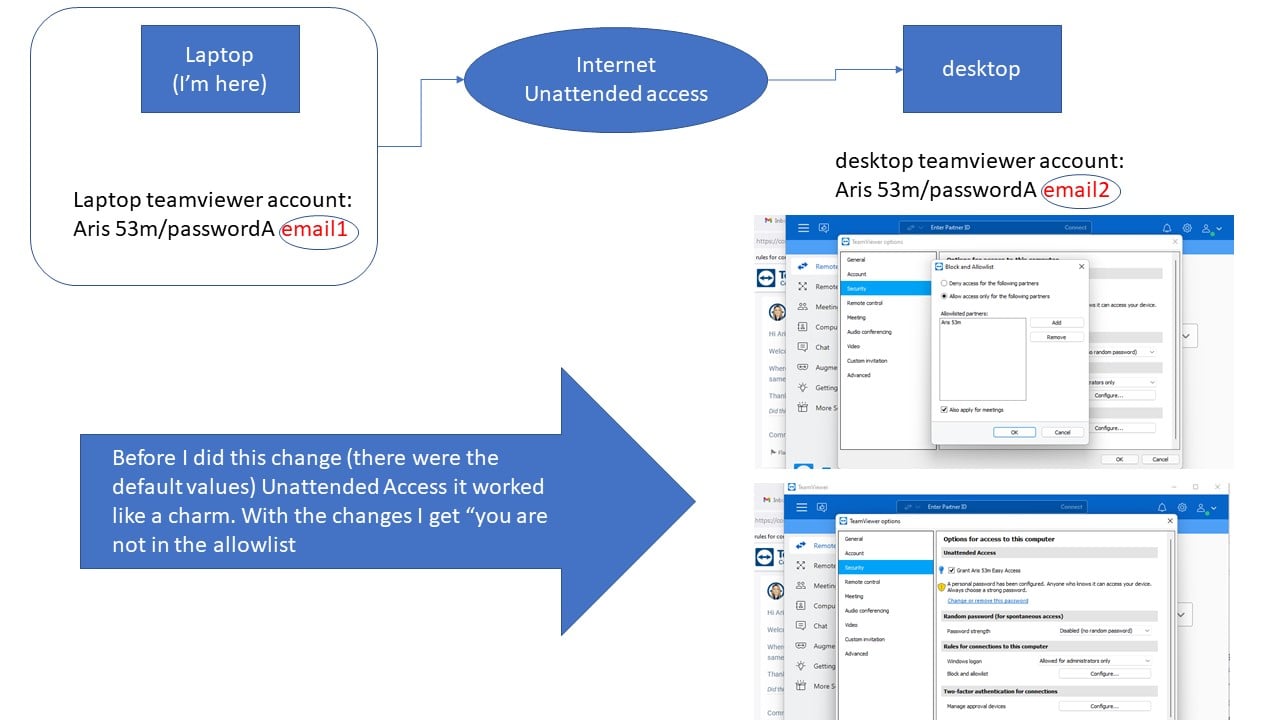
Is there anyway to change yesterdays setting in my home pc remotely? (via the web may be?)
Regards, Aris 53m
hi Eshther
May i was not clear to you and Benjamin to what I was looking for.
I was trying to undo REMOTELY a stupid set up I did which was blocking me to have remote access (on unattended mode).
I solved the problem by sending someone to my (remote) home to change the incorrect setting.
Everything is back to normal again.
As a suggestion and since Teamviewer is an excellent s/w for what it does I would suggest to have a back up plan for similar cases. (May be a web interface where someone can do a reset or something).
Anyways, you;ve tried your best and I've appreciated it.
Regards, Aris.
Hi again Aris,
Once again regarding the account: Are you logged in?
If yes, I wonder whether you maybe added this account to the blocklist instead of the allowlist.
Is that possible?
Thanks, Esther
by the way, are you here?
here is what i get from my desk top (the distant pc)
Hey @Aris53m ,
I tried to reproduce the issue on my machines but it worked as intended.
--> connection established
For my second test I did the following:
Third test
So in general it should work like this.
Something you can definitely check is if you're logged in with the account that was whitelisted on the remote side.
Let us know if any of that worked for you :)
Best regards,
Benjamin
i'm logged in to my laptop as admin with the teamviewer ID for the laptop
may the pic is more helpful
Can you verify you are logged in with the correct account on your local device?
but this is not possible.
Sorry - I think I did not actually explain how to perform a Windows Authentication via TeamViewer.
👉Instead of the TeamViewer authentication using TeamViewer ID and password, you can also authenticate with username and password of your Windows account.
How to connect using Windows Authentication:
The TeamViewer authentication dialogue will open:
We have this article that explains the steps pretty well too: Control UAC during a TeamViewer connection - TeamViewer Support
by the way, i use two factor authorization ....
ok, here is a couple more things.
Ok - thanks for the explanation!
First thing to check: Are you logged in with the account Aris 53 m on your current computer? Because the remote device will check your "identity" and only allow this account to make a connection.
Also, you need to be a Windows admin on the remote device and login with the Windows credentials instead of the "normal" TeamViewer connection method.
For this:
1.) Type in the remote ID and click Connect
2.) Click on Advanced and choose Windows under Authentication
3.) Type in the Admin credentials for the remote device and click Log On.
That should be the solution.
Thanks,
Esther
Is there any way to fix this remotely?
Hi Aris,
Welcome to our Community. I hope I will be able to help you, however - can you explain what setting you made yesterday explicitly?
Where do you put the rule exactly? Can you maybe send a screenshot from your device within the setting so that we are talking about the same thing?
Learn more about the latest feature we’ve released.
Discover quick, practical tips to get more out of TeamViewer each month.