How to remove the sessions list teamviewer icon that shows on the right side bottom of the screen
( I see we can minimize it but I dont want it to show it on screen)
Hello @johanvandemerwe,
Welcome to TeamViewer Community!
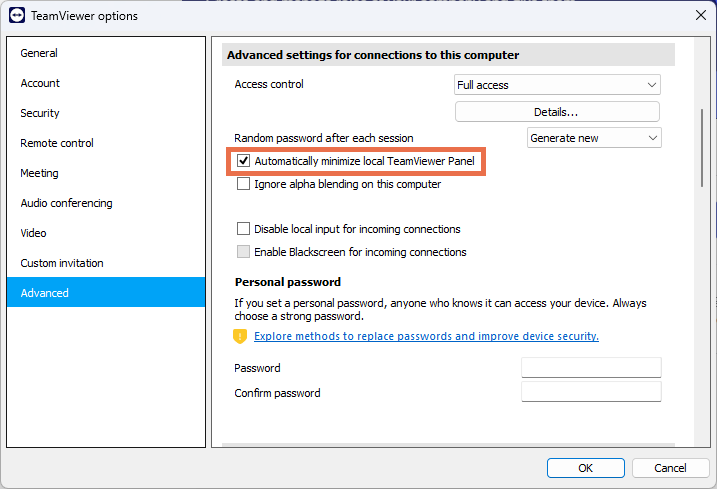
When the remote session starts, the icon will show up on the partner's side. You can configure it to be minimized; however, for security reasons, it cannot be fully disabled.
Here is how you can minimize the icon:
3. Click on OK.
We hope this helps. If you need further assistance, please let us know. We will be happy to support you.
Wishing you a great day!
Elif
I don't know if any progress has been made since the question was asked in 2022. Currently I am working with the new interface of version 15.72.3 (24b30327530) in late 2025 and as you can see this icon is really in the way and covering some critical buttons when working in full-screen. It would be great to be able to move it at least along the Y-axis up and down in a following version. Teamviewer developers managed it with the toolbar on top to move it around, this one would be a great gift for users as well.
Hi Justin,
Yes. this is what I was asking about . Now after minimizing also it shows as you mentioned .
Regards
Hi @pk1973,
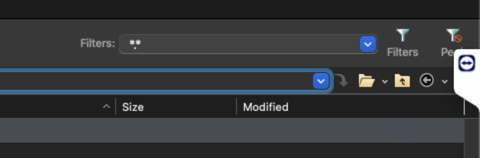
If you are referring to the panel on the right-hand side of the screen, there is no way to remove it or hide it completely. You can minimize it, so it looks like that:
Please let me know if that answered your question. 🍀
Happy weekend,
Justin
Be part of the conversations shaping TeamViewer.
Learn more about the latest feature we’ve released.
Discover quick, practical tips to get more out of TeamViewer each month.