Customize more than ever - TeamViewer Remote just took a major step forward.
Until now, customization has focused mainly on modules like Host and QuickSupport. But with full client customization, you can now shape the entire TeamViewer experience to match your needs.
Add your own disclaimer and terms and conditions directly into the full client, and automatically assign devices to the right groups from the start. This not only simplifies device management but also helps you align every deployment with your internal processes while keeping everything centralized and under control.
Why you’ll benefit from this
- Meet internal compliance requirements by adding your own disclaimer and/or terms and conditions.
- Save time on device management by automatically assigning devices to groups.
- Ensure consistency across deployments with a standardized TeamViewer client setup.
- Reduce manual setup steps during onboarding and rollout.
- Use it across environments, including both the web and the desktop client.
How to create your custom TeamViewer full client
Setting up a custom full client is simple:
- Go to Custom modules in the Admin settings.
- Click Create custom module.
- Select Full client.
- Enter a module name.
- Enable group assignment options if needed:
- Use managed group assignment (Learn how to set up automatic assignment here)
or - Automatically add the device to a group (Learn how to manage your device groups here)
- Add your preferred disclaimer and/or terms and conditions.
- Click Save.
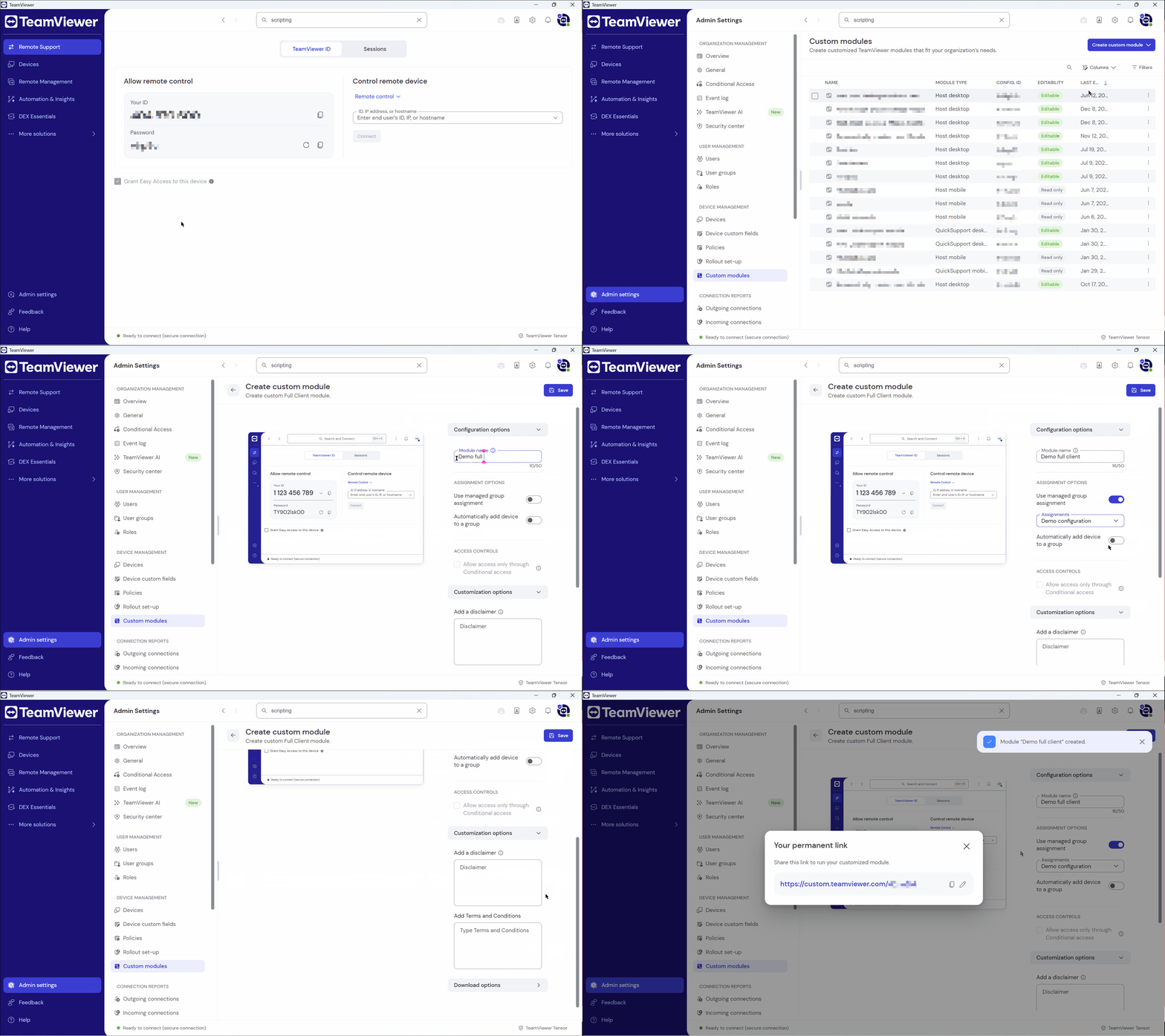
Once created, your custom TeamViewer full client is ready to support a more consistent and compliant rollout.
Example scenario
Imagine an IT team rolling out TeamViewer across multiple internal departments.
The company needs every installation to display an internal legal disclaimer, and all newly deployed devices should automatically appear in the correct managed group. Instead of handling this manually after installation, the admin creates a custom full client once and uses it as part of the deployment process.
The result: a cleaner setup, less admin effort, and a more controlled onboarding experience for devices.
Share your feedback
Have you tried customizing the full client yet?
Tell us how it fits into your workflow. We’d love to hear what’s working for you!
